
Showing all 22 results




Efficient and secure data transfer is the lifeline of modern machining. Whether you are backing up critical system parameters, transferring complex 3D G-code programs, or running DNC (Direct Numerical Control) operations, relying on high-quality memory media is non-negotiable. At 24CNC, we provide a comprehensive range of industrial-grade CNC memory cards, PCMCIA adapters, and dedicated card readers designed to withstand the rigors of the heavy industrial machine shop environment.
Unlike standard consumer electronics, CNC manufacturing environments present unique, harsh challenges. Electronic components are routinely exposed to fine metallic dust, continuous low-frequency vibration, coolant mist, high temperatures, and severe electromagnetic interference (EMI) from spindle motors and servo drives. Standard retail memory cards often suffer from immediate data corruption or sudden physical failure under these extreme conditions. This inevitably leads to scrapped parts, tool crashes, or hours of lost programming and setup time. Our specialized inventory features genuine, ruggedized memory solutions tailored specifically for strict compatibility with both legacy and modern CNC control systems, ensuring your manufacturing data is always safe, accessible, and accurately executed.

The Evolution of CNC Memory and Data Transfer
To truly understand the value of industrial-grade memory, it is helpful to look at how CNC data transfer has evolved. Decades ago, machines relied on punched paper tape readers—a slow, error-prone method. This evolved into RS-232 serial communication, which allowed direct PC-to-CNC transfer. However, RS-232 is notoriously slow, often capped at a baud rate of $19,200$ or $38,400 \text{ bps}$. When machining complex 3D molds with thousands of tiny line segments, the machine would often “starve” for data, leading to stuttering movements and poor surface finishes.
The introduction of the PCMCIA slot on controllers (most notably championed by Fanuc™) revolutionized the shop floor. By utilizing a PCMCIA adapter housing a Compact Flash (CF) or SRAM card, operators could load megabytes of data directly into the machine interface in seconds, or run complex programs directly from the card via M198 calls, completely eliminating RS-232 bottlenecking.
Essential CNC Card Categories
To facilitate seamless, high-speed communication between your offline programming department (CAM) and the shop floor, we categorize our memory solutions into three primary areas:
- Compact Flash (CF) Cards: The undisputed industry standard for reliable CNC data storage. We stock critical low-capacity industrial CF cards (specifically $256 \text{ MB}$, $512 \text{ MB}$, $1 \text{ GB}$, and $2 \text{ GB}$). These specific capacities are strictly required by legacy controllers like older Fanuc™, Siemens, and Mitsubishi systems that physically cannot format or read modern high-capacity SD cards. These industrial cards feature SLC (Single-Level Cell) NAND flash architecture for superior read/write longevity.
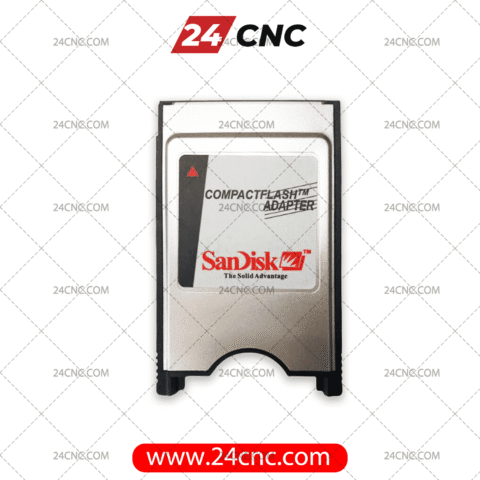
- PCMCIA Adapters: Most industrial CNC controls from the late 90s to the 2010s feature a Type II PCMCIA slot directly on the front operator panel. Our rugged CF-to-PCMCIA adapters bridge the gap, allowing you to insert a standard Compact Flash card directly into the machine’s primary memory interface. They are precision-machined with reinforced metal rails to ensure a tight, vibration-resistant fit for continuous, error-free DNC drip-feeding.
- Card Readers: For the PC workstation side of your operation, we offer high-speed, USB-based industrial card readers. These peripherals ensure that the critical G-code generated by your Mastercam, PowerMill, or NX software is rapidly and accurately written to the CF card without the risk of hidden file corruption caused by cheap, generic multi-readers.

Industrial SLC vs. Consumer MLC NAND Flash
One of the most common questions we receive is why a $1 \text{ GB}$ CNC memory card costs more than a generic $64 \text{ GB}$ SD card from a local electronics retailer. The answer lies entirely in the internal flash memory architecture.
Consumer cards use Multi-Level Cell (MLC) or Triple-Level Cell (TLC) NAND flash. This technology crams multiple bits of data into a single memory cell to increase storage capacity cheaply. However, this dramatically reduces the lifespan and reliability of the card. A consumer card might only survive $3,000$ to $5,000$ read/write cycles before cells begin to die.
In contrast, the industrial CF cards available at 24CNC utilize Single-Level Cell (SLC) NAND flash. SLC stores only one bit of data per cell. This results in significantly faster read/write speeds, immunity to data corruption, and a massive lifespan of over $100,000$ read/write cycles. Furthermore, our industrial cards are rated for extended operating temperatures, safely functioning from $-40^\circ\text{C}$ to $+85^\circ\text{C}$, whereas commercial cards often fail if the shop floor exceeds $+40^\circ\text{C}$ during peak summer production.
Why Standard Memory Fails in CNC Applications
Many machinists and procurement officers attempt to use off-the-shelf commercial memory adapters and high-capacity cards, only to encounter frustrating “Memory Card Error” or “Format Failed” alarms on the CNC screen. This occurs for several stringent technical reasons:
- Strict Capacity Limits: Legacy systems operating on older BIOS architectures (such as Fanuc Series 16i, 18i, 21i, and early 0i models) have very strict addressable memory limits. They utilize a 16-bit file allocation table, maxing out the readable partition at exactly $2 \text{ GB}$. A modern $8 \text{ GB}$, $16 \text{ GB}$, or $64 \text{ GB}$ card will simply not be recognized by the machine’s motherboard.
- Specific Voltage Requirements: Industrial PCMCIA slots on older CNC main boards often operate at a full $5 \text{ VDC}$, while modern consumer laptop adapters are optimized for lower $3.3 \text{ VDC}$ environments. Using incorrect voltage adapters can literally burn out the memory card or, worse, damage the expensive I/O board on the CNC machine itself.
- File System Compatibility: CNC controllers require specific formatting, usually FAT16 or FAT32 with very specific allocation unit (cluster) sizes. Industrial cards are factory-prepared and programmed at the firmware level to handle these older file systems natively.
Technical Comparison: CNC Data Transfer Solutions
| Component Type | Primary Function | Typical Specifications | Compatibility Notes |
|---|---|---|---|
| Industrial CF Card | Storing G-code & SRAM Parameters | $256 \text{ MB} – 2 \text{ GB}$, SLC NAND Flash | Fanuc 0i/18i/31i, Siemens 840D. Requires FAT16. |
| PCMCIA Card Adapter | Interface between CF card and Machine Panel | Type II PCMCIA, $5 \text{ VDC} / 3.3 \text{ VDC}$ Auto-sensing | Plugs directly into the front-panel operator interface slot. |
| USB Card Reader | PC workstation to CF card data writing | USB 2.0 / USB 3.0, up to $50 \text{ MB/s}$ transfer | Compatible with Windows OS for CAM software output. |
| SRAM Card (Legacy) | Parameter Backup for Very Old Systems | $2 \text{ MB} – 8 \text{ MB}$, Internal Battery Backup | Fanuc Series 15, early 16/18. Replaceable coin battery. |
Controller-Specific Compatibility Guide
Selecting the right memory card depends entirely on the specific make, model, and generation of your CNC controller. Here is a brief overview to guide your procurement:
Fanuc Control Systems
For mid-generation Fanuc systems (Series 16i, 18i, 21i, and early 0i-Mate), the golden rule is to never exceed $2 \text{ GB}$. The ideal capacity for these machines is usually $512 \text{ MB}$ or $1 \text{ GB}$. These older systems expect a FAT16 formatted card. If you are operating newer Fanuc 31i, 32i, or 0i-F controls, they have slightly better compatibility and can sometimes utilize up to $4 \text{ GB}$ cards formatted in FAT32, but sticking to $2 \text{ GB}$ remains the safest and most reliable standard practice.
Siemens and Mitsubishi Systems
Siemens Sinumerik controls, particularly the highly popular 840D and 828D series, often feature a direct CF slot hidden behind the main operator panel door, negating the need for a PCMCIA adapter. These controls also demand industrial-grade SLC cards due to the constant reading and writing of HMI data and part programs. Mitsubishi Meldas controls have similar PCMCIA slots to Fanuc and follow the exact same $2 \text{ GB}$ maximum capacity rules.
Frequently Asked Questions (FAQ)
1. Why is my Fanuc control giving a “Memory Card Error 099” or “1010”?
This specific alarm code usually indicates that the CNC controller cannot read the root directory of the inserted card. It is almost always caused by using a consumer card with too large a capacity (over $2 \text{ GB}$), a card that has been formatted in NTFS or exFAT instead of FAT16, or a physically damaged PCMCIA adapter with bent interface pins. Switching to one of our guaranteed industrial $512 \text{ MB}$ or $1 \text{ GB}$ CF cards combined with a fresh adapter usually resolves this instantly.
2. Can I drip-feed (DNC) huge 3D surfacing programs directly from these cards?
Absolutely. In fact, it is the preferred method for modern shops. Many legacy and current controls support M198 or dedicated tape-mode DNC operations directly from the PCMCIA memory card slot. Because 3D surfacing generates massive G-code files that exceed internal CNC memory, reading from the card is essential. Using a high-quality, vibration-resistant adapter and a genuine industrial CF card is highly recommended to prevent data buffering errors, surface gouges, or machine pauses during critical machining passes.
3. Do you sell original brands like SanDisk and Fanuc OEM cards?
Yes, we source from top-tier memory manufacturers known for industrial reliability, including specific industrial lines from SanDisk, as well as strict OEM-equivalent cards that meet or exceed the original factory specifications laid out by the major controller manufacturers.
4. How exactly should I format my new CNC memory card?
For the absolute best compatibility, we strongly recommend formatting the card directly inside the CNC machine’s boot system (BOOT MENU) rather than on a Windows PC. The CNC will automatically format it with the exact sector size it requires. If you must format it on a desktop PC, ensure you right-click, select Format, and choose FAT (which is FAT16) for cards under $2 \text{ GB}$. Never select FAT32, NTFS, or exFAT for older machines.
5. How do I clean and maintain my machine’s PCMCIA slot?
Over time, shop air containing coolant mist and fine cast iron dust can penetrate the control panel. If your card suddenly stops reading, do not force it. We recommend using a specialized electronic contact cleaner and a quick burst of clean, dry compressed air to clear the slot. Regularly inspect your PCMCIA adapter to ensure none of the 68 pin holes have become clogged or damaged.
Secure Your Critical CNC Data Today
In the machining industry, lost data equals lost money. Don’t risk catastrophic machine downtime, lost parameter backups, or scrapped parts due to cheap, consumer-grade memory. Browse our extensive, rigorously tested selection of industrial CF cards, heavy-duty PCMCIA adapters, and reliable card readers. Need help finding the exact capacity and format for your specific control model? Our CNC electronics experts are here to assist.